Observatory icon
v1.1.0 · signed · notarized SwiftUI Charts macOS 14+ Self-hosted Grafana

Your Grafana. On your desktop.

Native macOS widgets for Grafana. Browse your dashboards, pick any panel, watch it live on your desktop — rendered with SwiftUI Charts, not PNG snapshots.

Observatory
teraflops · 17:48
CPU
%
Memory
%
p95 latency
ms
5xx / s
/s

Fake data on this page. In the app, these are your own Prometheus queries.
built with SwiftUI · WidgetKit Swift Charts URLSession Grafana /api/ds/query Developer ID signed · notarized
how it works

Talks to your datasource.
No image plugin. No cloud.

Observatory doesn't scrape Grafana screenshots. It reads the panel's query, sends it to your datasource via Grafana's own /api/ds/query, and renders the result with Swift Charts — same data path your browser uses, but native and GPU-accelerated.

  • Service account tokens, stored in a local JSON config.
  • Template variables resolved from the dashboard + your overrides.
  • Nothing leaves your Mac except the query to your own Grafana.
# your panel in Grafana
sum(rate(http_requests_total{code="5.."}[5m]))
# POST to your Grafana
POST /api/ds/query · Bearer glsa_…
5xx / s 1.4
what's inside

Built for developers who already have a Grafana.

Observatory is a small, opinionated companion — not a Grafana replacement. It does one thing well: put the metrics you already watch on your desktop, native and fast.

Native SwiftUI Charts

Every sparkline is drawn with Apple’s Swift Charts. GPU-accelerated, crisp at any size, no PNGs, no iframes, no blurred screenshots.

Pick any panel

Browse every dashboard in your Grafana. Check any panel — the query, datasource and unit snap into a widget slot. No YAML, no config files.

Three widget sizes

Small, medium, and 2×2 large. The configurable widget lets you pick up to four panels per instance from your favourites.

Self-hosted only

Point it at your own Grafana. Your service account token lives on your Mac. The only network call it makes is to you.

Legit TLS required

HTTPS with a real cert, or HTTP on your local network. No self-signed circus, no custom trust stores, no support-ticket rabbit holes.

Signed + notarized

Developer ID code signed and notarized with Apple. Hardened runtime on. Open it, run it, add it to the Dock.

tour

Five steps from "just installed" to "always watching".

step 01

Your Grafana, one pane.

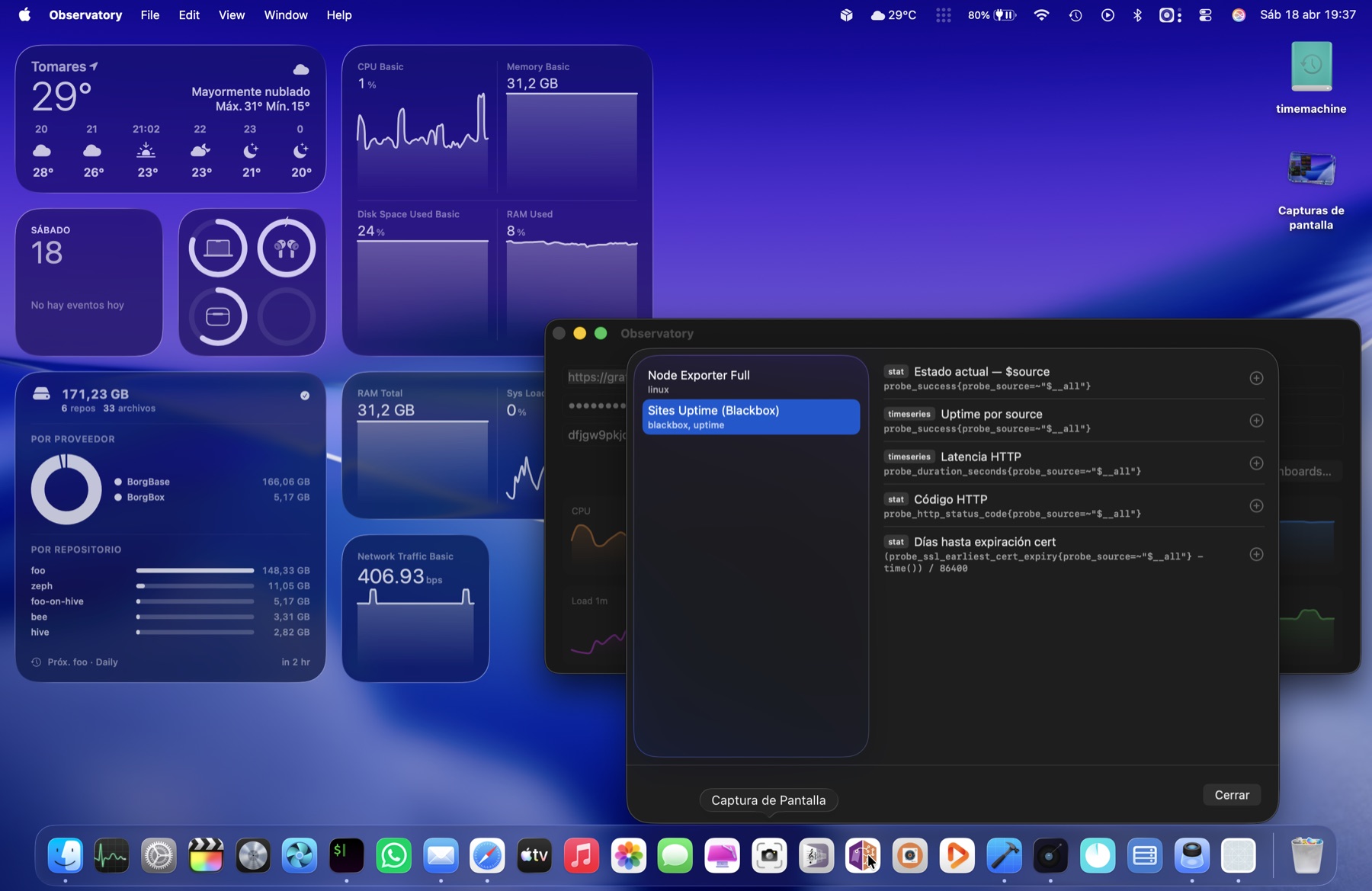
Paste the URL, a service account token and your datasource UID. Observatory lists every dashboard, grouped by folder, with badges for panel type.

Observatory app window with the dashboard browser sheet open, showing Node Exporter Full and Sites Uptime panels
step 02

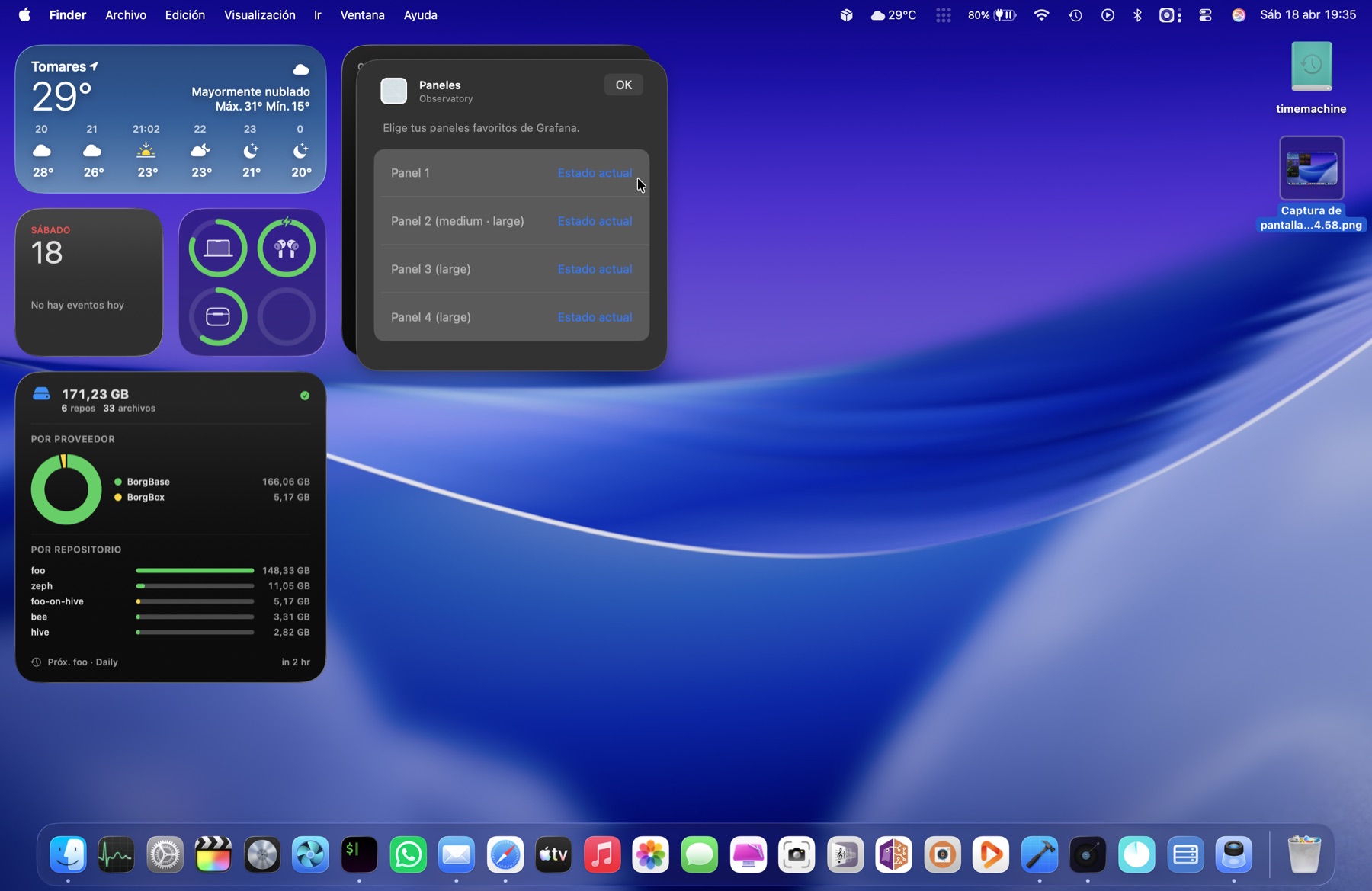
Four slots per widget.

Every large widget has four panel slots. Small renders slot 1, medium slots 1–2, large is a 2×2 grid. Pick any mix.

Widget edit sheet showing four configurable panel slots
step 03

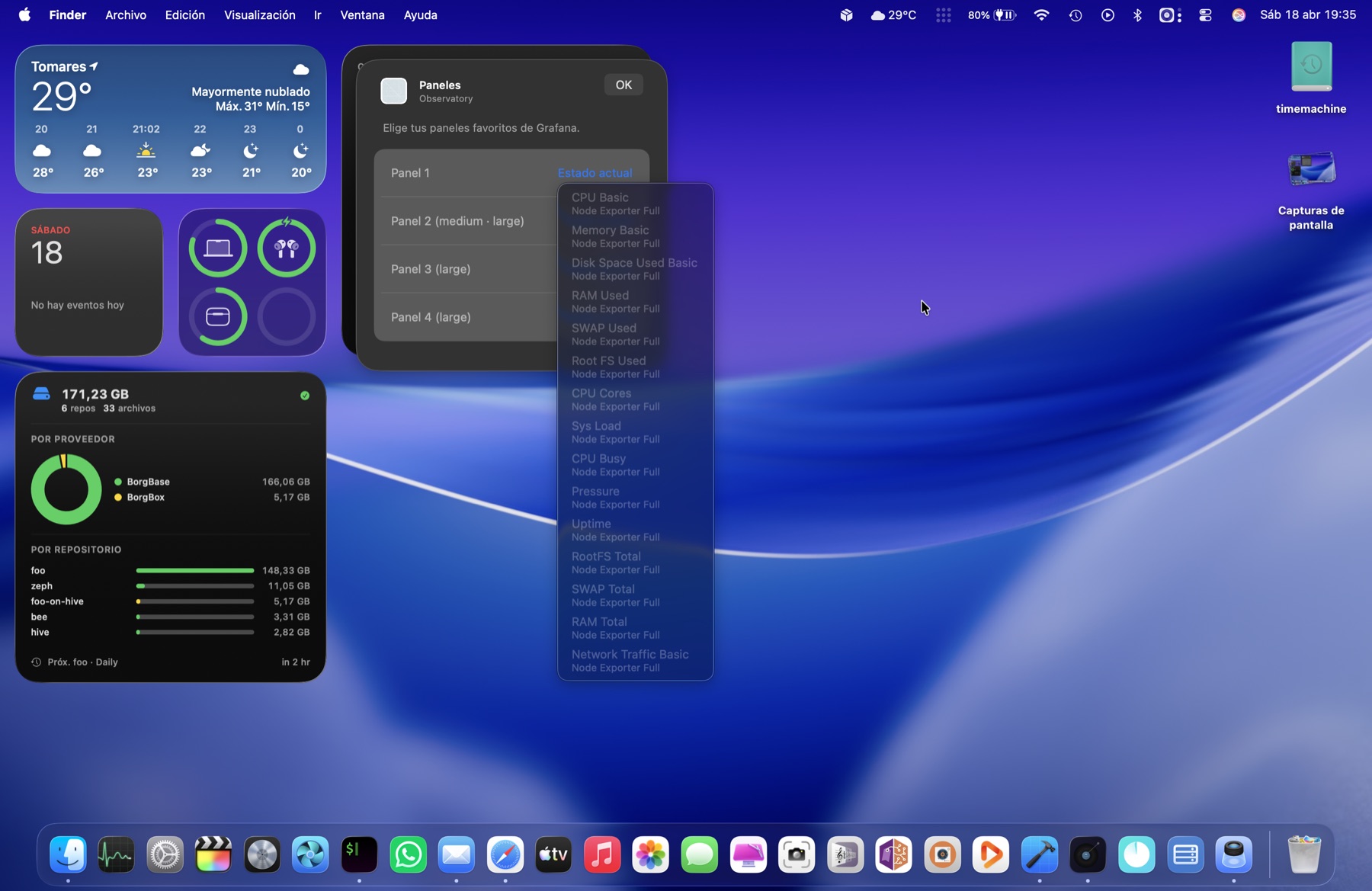
Pick any panel you’ve favourited.

Stars in the dashboard browser add panels to your favourites. They show up as dropdown options in every slot — CPU Basic, RAM Used, Sys Load, Network Traffic…

Slot dropdown open, listing panels from Node Exporter Full
step 04

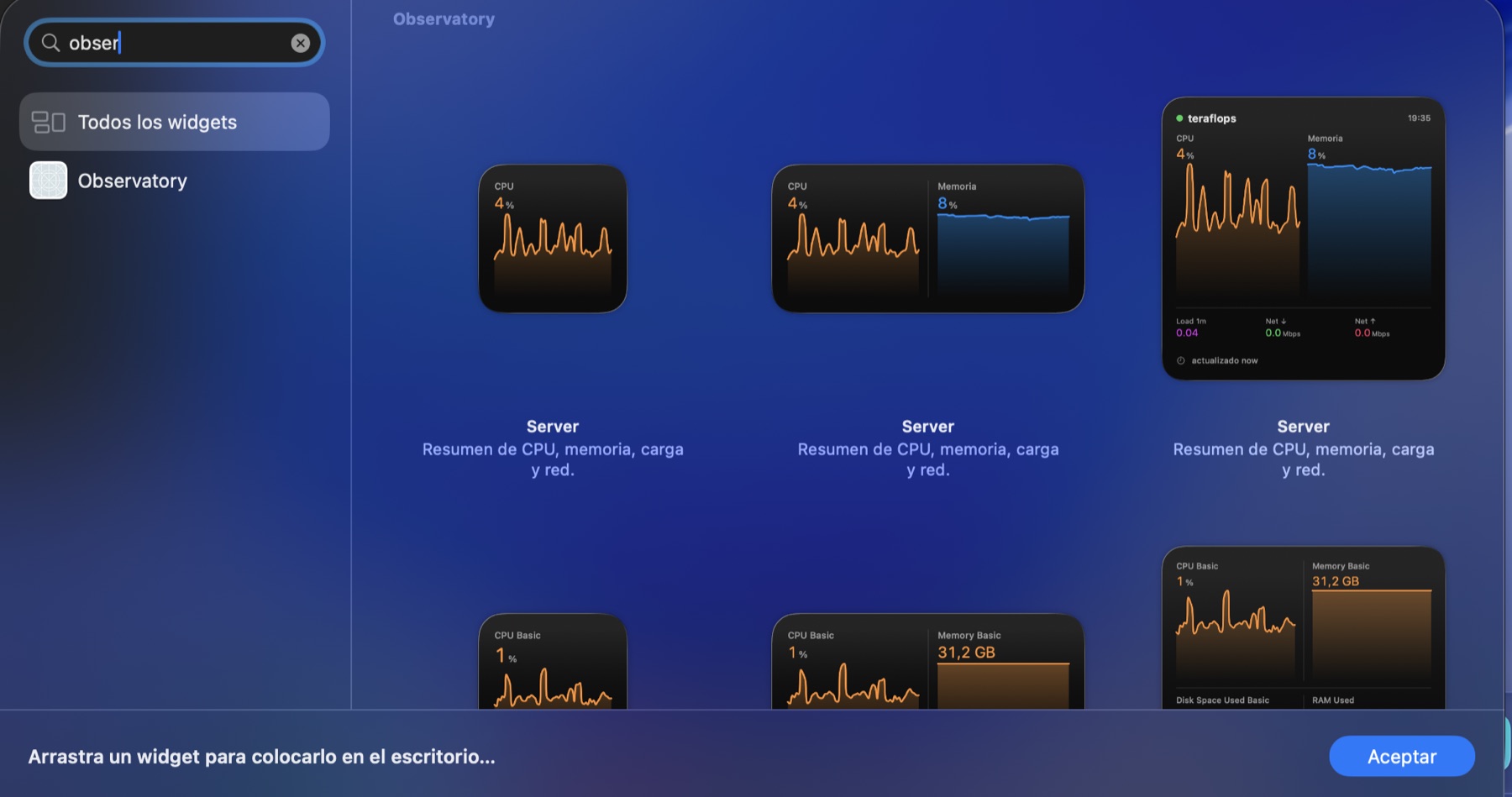
Three native sizes.

Observatory registers small, medium and large widgets with macOS. Drag any of them from the standard widget gallery, just like Weather or Calendar.

macOS widget gallery with Observatory widgets in three sizes
step 05

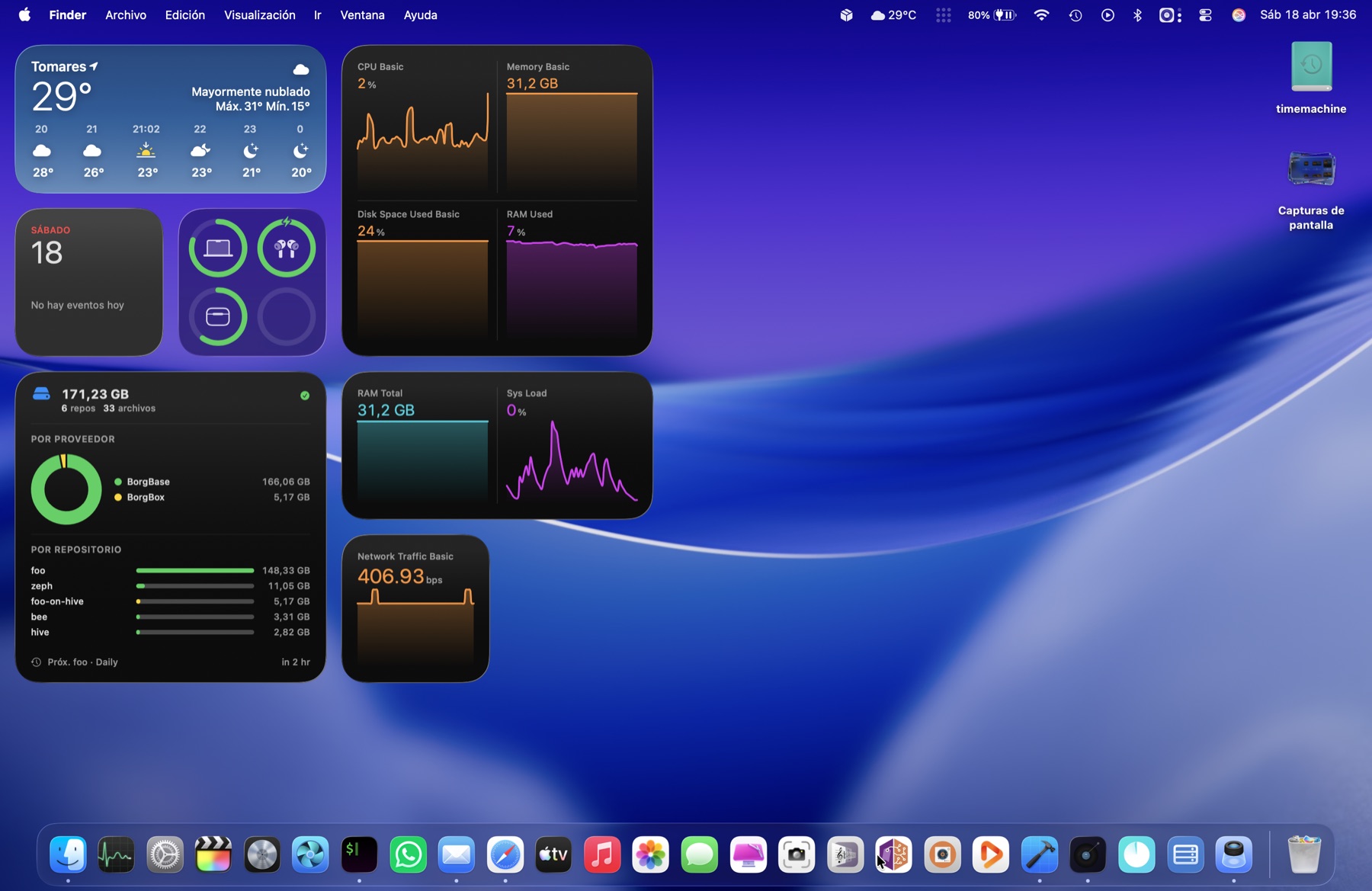
Always on your desktop.

WidgetKit refreshes each sparkline in the background. CPU, memory, disk, load, network — live from your own Grafana, rendered with Swift Charts.

macOS desktop with several Observatory widgets showing live Grafana data

Ready for your desktop.

Observatory 1.1.0. macOS 14 or later. Signed with a Developer ID and notarized — no scary Gatekeeper dialog.

14-day free trial from first launch. When you're ready to buy, do it from inside the app — Settings → License → Buy a license opens checkout, paste the key back into the same window and you're set.

Download Observatory 1.1.0

~4 MB · one-time purchase · powered by Lemon Squeezy